Use case · Match
Find a research partner from an abstract or a problem statement
For anyone that needs to find the right expert to help with their research problem.
Free plan · No credit card required
You know the problem well enough to write it down. What you don't know is who, out of everyone publishing and inventing, has spent the last five years on the specific version of it that you have. Keyword search returns whoever used the same words. A colleague's introduction returns whoever your colleague knows. Neither is based on your specific problem.
Partner search is. It takes the text you already have and matches researchers on what they have published, patented, and written about themselves.
How it works
A worked example. An R&D lead at a specialty-materials company has a 300-word internal memo on catalytic depolymerization of polyurethane foam, and needs a university group that has run it at the bench rather than modeled it.
Step 1: Paste the text
Open Discover → Partner search and paste the note. Anything from 30 to 5,000 characters works: an abstract, a specific aim, a statement of work, an internal memo. Set Show researchers at to Universities and institutes when you need an academic group, or to Companies when you need someone in industry. The text is never written into a URL, your browser history, or a server log. It's stored with the saved shortlist on your account.
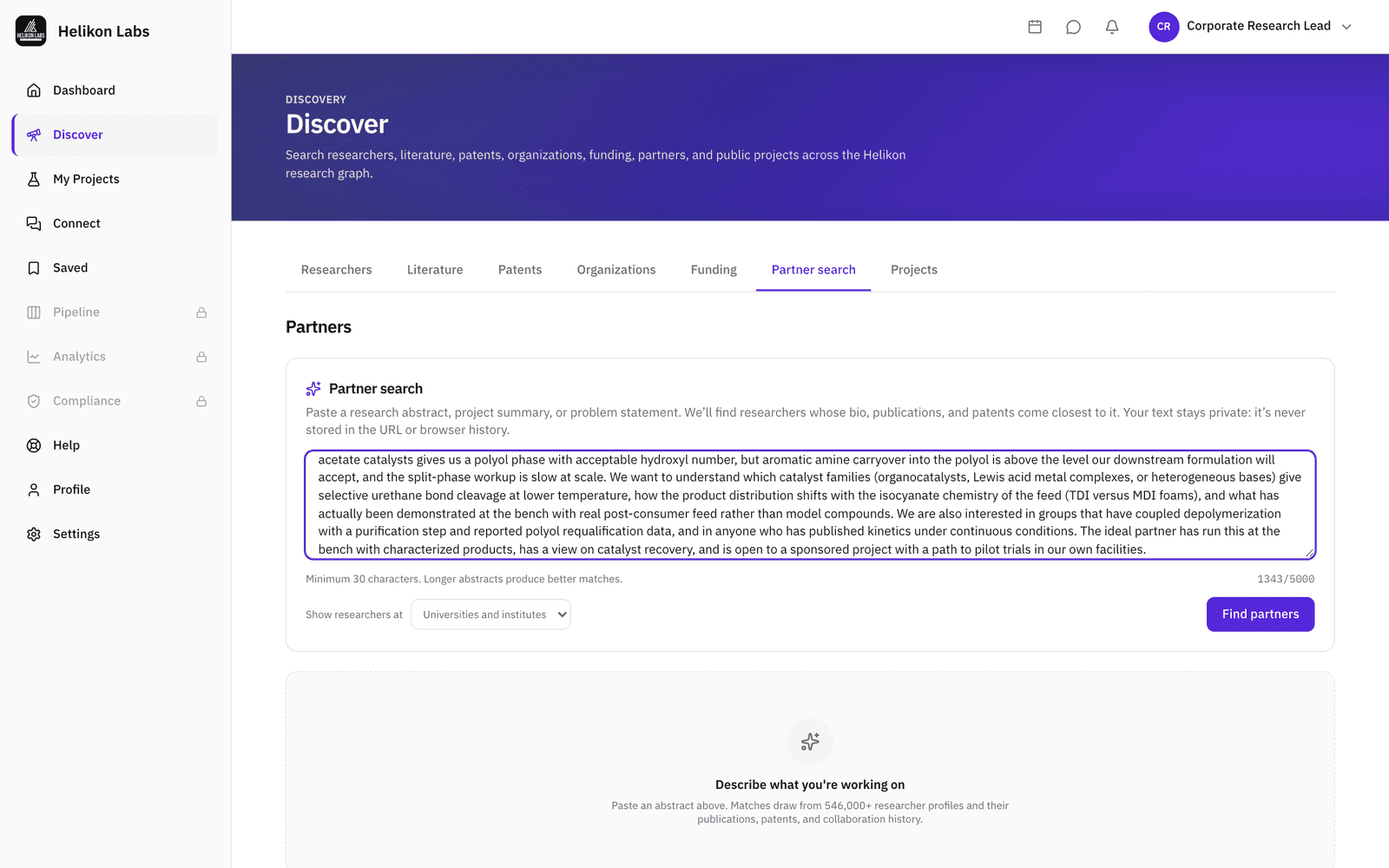
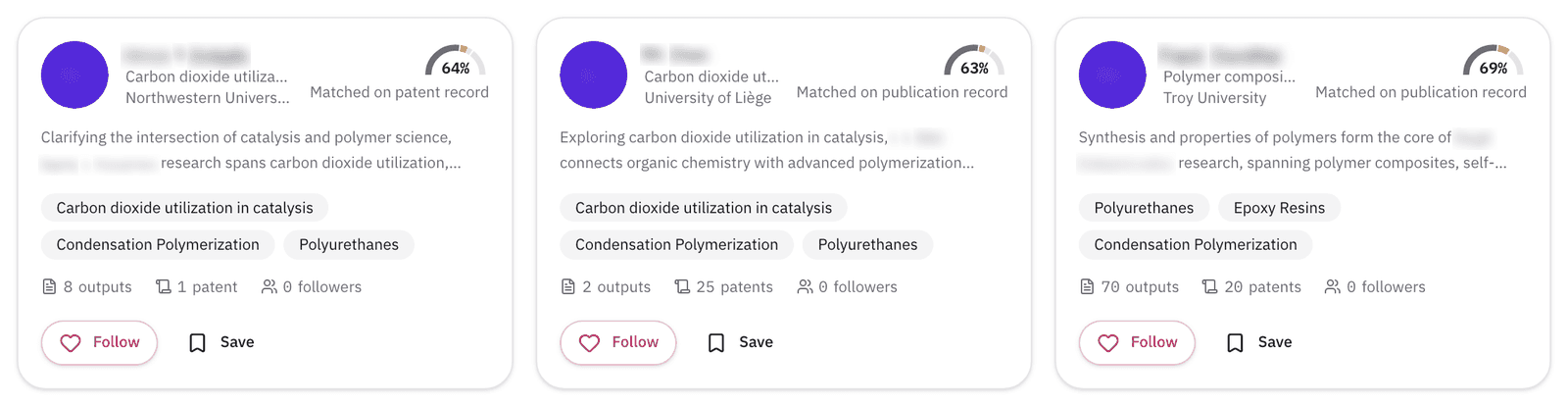
Step 2: Read the result cards
Results are matched across 500,000+ researcher profiles on their publications, patents, and bio, closest first. Each card shows a match score, the part of the record it matched on (publication record, patent record, or profile summary), a bio snippet, top expertise, and publication and follower counts. Once you open the results, the search is saved to your account as a shortlist you can reopen any time.
For the polyurethane note, with Universities and institutes selected, expect university chemists working on polyurethanes and catalytic carbon dioxide chemistry, each matched on their publication or patent record.
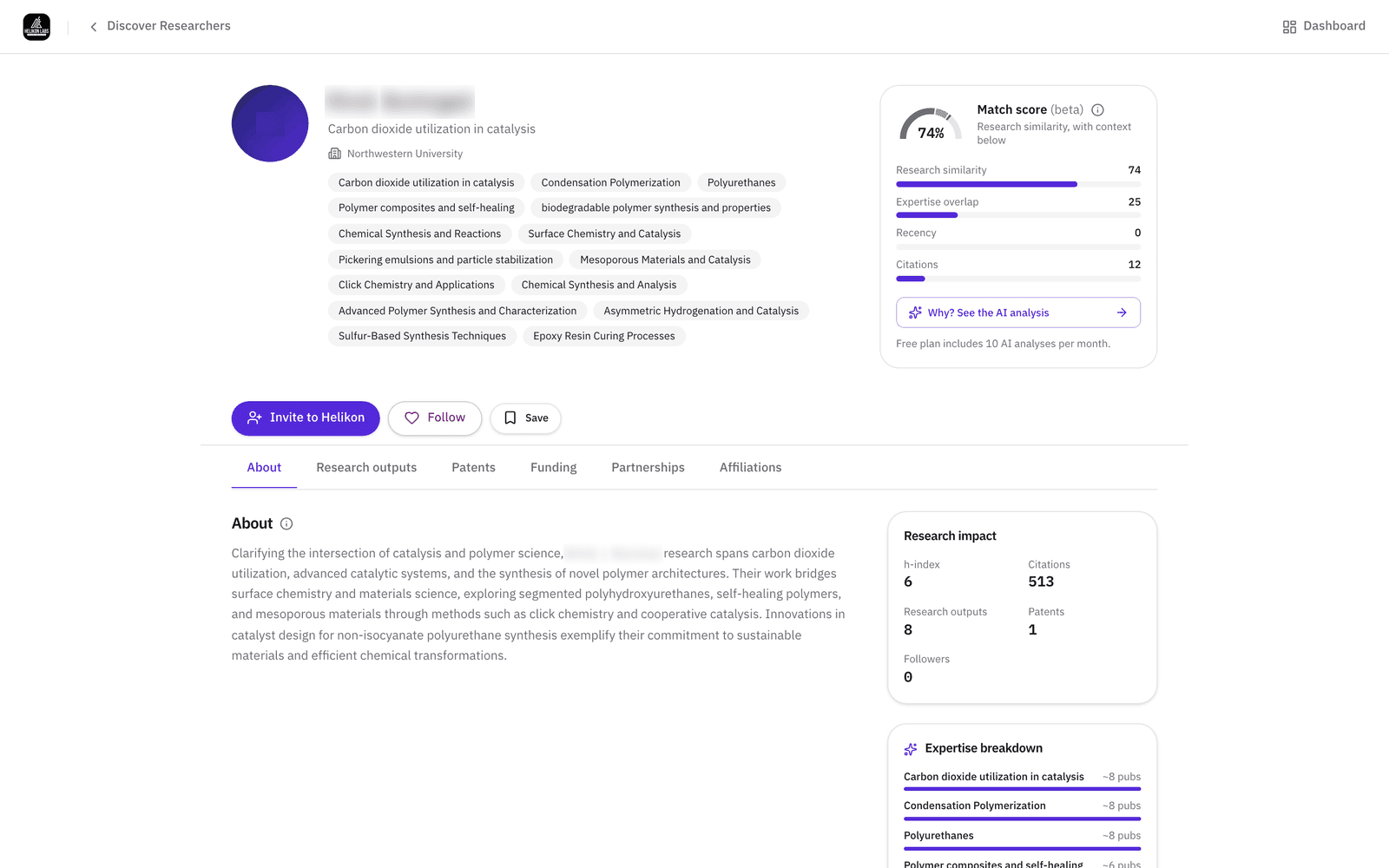
Step 3: Open a profile and check the match
The profile shows the score breakdown on every plan: research similarity, expertise overlap, recency, and citations, with the evidence behind each. Why? See the AI analysis opens an explanation of the collaboration fit between your profile and theirs (10 a month on Free, unlimited on Pro). The Research outputs tab lists the papers. Open one to see which patents cite it. The Funding tab shows what the researcher has been funded to do, from their publication record.
If one of the depolymerization papers is cited by three granted patents, two of them a competitor's, that shows in the same panel.
Step 4: Save, follow, or write
Save the profile with a private note and tags. Follow to see new papers on your dashboard. Message to start a conversation. A researcher who hasn't signed up yet has Invite to Helikon in place of Message on their profile page, and the platform emails the invitation (10 per month on Free, 50 on Pro). When they reply, propose a meeting and everyone gets a calendar invite.
A shortlist of three tagged “PU chemical recycling” and one message is the whole first pass.

What you’ll see
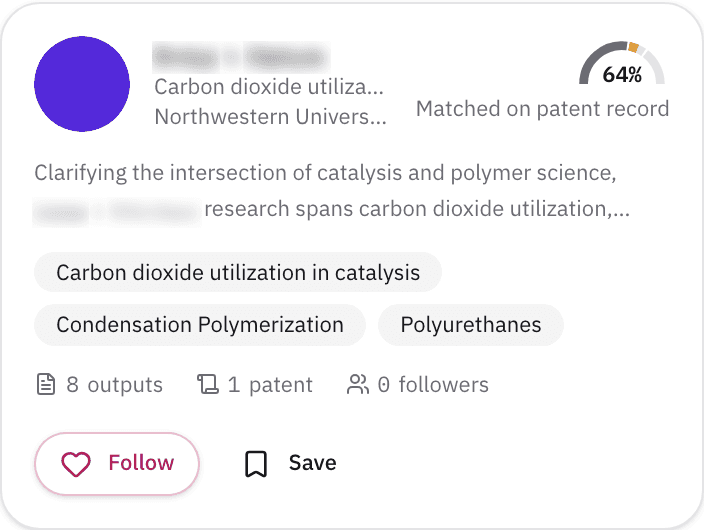
- 1. Match score. How closely their closest single record matches your text. The list is ordered by overall fit across publications, patents, and the profile summary, so a lower percentage can sit higher.
- 2. Matched on publication record / patent record / profile summary. Which part of the record matched best. The card names which part rather than guessing a single paper.
- 3. Bio snippet and top expertise. Two lines of bio and three expertise chips. For imported profiles, the bio is AI-generated from their record and says so on the full profile.
- 4. Counts. Publications and followers.
- 5. Save · Follow · Message. Imported profiles show Follow and Save on the card. Invite to Helikon is on their profile page.
What’s on Free, and what Pro adds
| Free | Pro | |
|---|---|---|
| Partner searches | Unlimited | Unlimited |
| AI collaboration analyses | 10 a month | Unlimited |
| New people messaged | 10 a month | 200 a month |
| Researcher invites | 10 a month | 50 a month |
| Saved items | 50 | Unlimited |
| Meetings | 5 a month | 50 a month |
The score breakdown, the saved shortlist, and every filter are on every plan.
Match
Partner search is our platform's version of the Match phase: partner discovery from the research record rather than from the network you already have. Read about the phase →
- Can I limit Partner search to universities or to companies?
- Yes. Set Show researchers at to Universities and institutes or to Companies before you search, and the results keep to that side. Partner search always returns researchers. To find the organizations themselves, use the Organizations tab or the assignee filter in Patents.
- What happens to the text I paste?
- It goes to the search and nowhere else: no URL, no server log. Once you open the results, the search and its text are saved to your account as a shortlist that only you can open. A search you never open expires after a few minutes.
- Why doesn't the card say which paper matched?
- Because the match runs over their whole record, naming one paper would be a guess. The card says which part of their record matched best (publication record, patent record, or profile summary), and the profile's Research outputs tab has the papers themselves.
Describe your problem. Find who's working on it.
Free plan · No credit card required