For research offices & TTOs
Your IP system starts at disclosure. Where does the collaboration before it live?
Faculty and companies find each other here from the research record, and the projects that follow carry their NDA, IRB, and contract dates where the people doing the work can see them.
Free plan · No credit card required
The work that decides the outcome happens before any system of record sees it
Sponsored programs sees the award. The technology transfer office (TTO) sees the disclosure. The contracts office sees the NDA. None of them sees the 18 months before any of those, when a faculty member and a company scientist traded a few emails and a site visit and either did or didn't become a partnership. By the time it reaches a system of record, the work that decided the outcome is over.
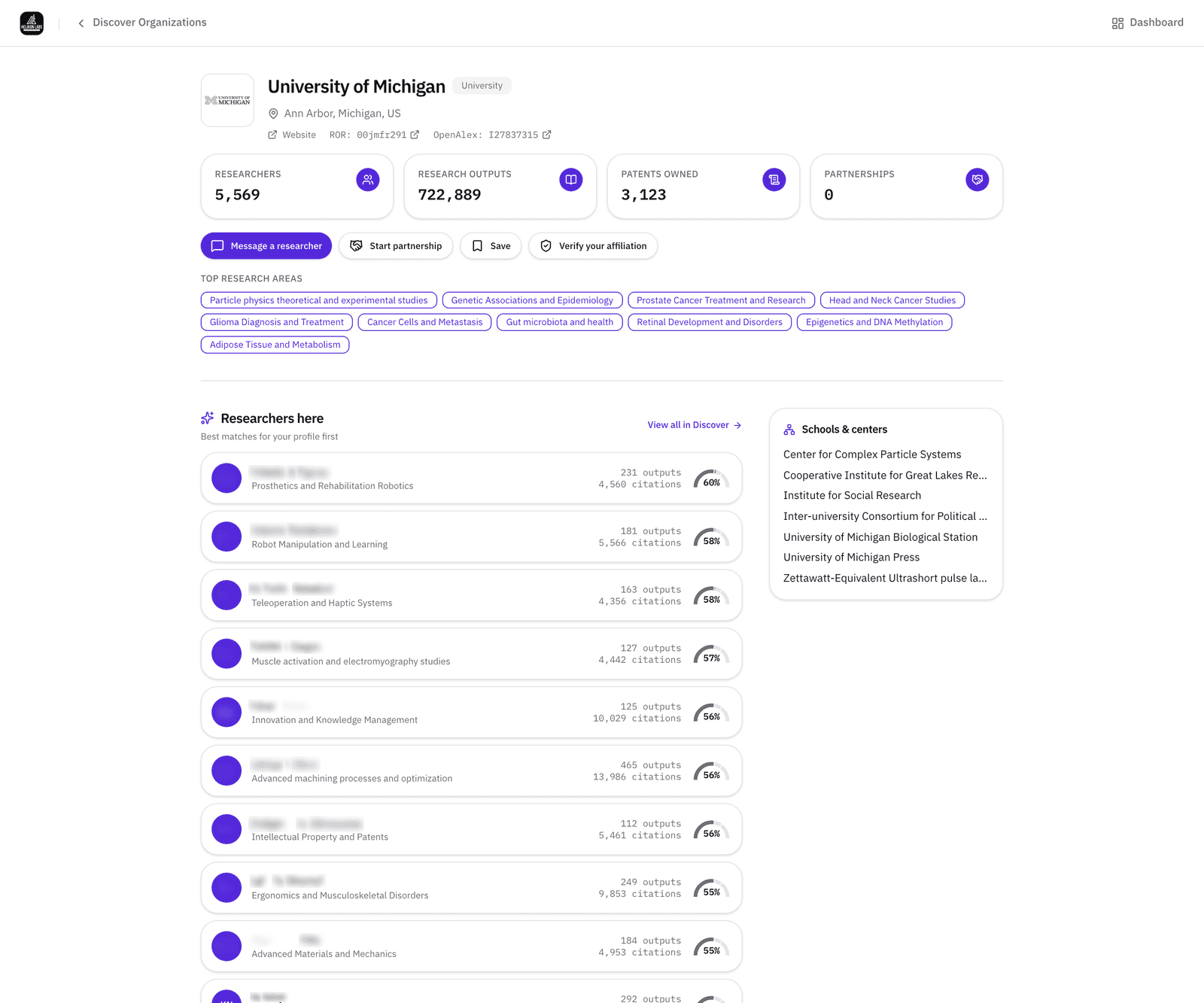
With the Helikon Labs platform, you can finally track the full research partnership lifecycle. Faculty and companies find each other from their research, and every project carries its compliance dates. The institution's page is already there, filled in from the public record before anyone has signed up.
Use cases
Four things research offices can do here
Find the right expert inside your own institution
Filter Discover → Researchers by your organization to find your researchers' work, including faculty who haven't signed up yet. Add Min h-index or Has bio, or open your organization page for its top research areas and most-cited researchers. Staffing a multi-PI proposal starts from a list instead of a memory.
Read the walkthrough →Find industry prospects for a technology
Start from the Cooperative Patent Classification (CPC) subclass on a disclosure or an issued patent. The Patents tab shows recent grants and their assignees, the Organizations tab rolls assignee names up to the company with its owned patents and research areas, and a faculty member's own paper shows which patents already cite it. Post a licensing project, and track the prospects in the pipeline.
Read the walkthrough →Run the collaboration with its dates on the project
Every project carries its members and roles, milestones with owners and reminders, files with a per-file audience, a discussion, and an activity log. A project flagged as needing an NDA, IRB approval, or a contract can't be activated while the date is missing, and each requirement carries an expiry date and a link to the evidence document, on every plan.
Read the walkthrough →Manage the partnership pipeline
Business development in the TTO and research development in the VP Research office work the same six-stage board: Lead, Initial Contact, In Discussion, Agreement, Active Partnership, Completed. Each card links to the researcher, the company, and the project, carries a next action with a due date, and converts into a project when the agreement is signed.
Read the walkthrough →When a company wants your university as its SBIR or STTR partner, our guide sets out what to agree before the proposal goes in: SBIR and STTR university partners: the rules, how to find one, and what to agree before you submit →
To work through it with the company and your PI, use the free checklist: SBIR and STTR partner readiness checklist: a free template for founders and university partners →
Browse technology areas
Each page counts the researchers, publications, and U.S. patents the Helikon Research Graph holds on one technology, shows who's working on it, and gives you a problem statement to run in Partner Search.
- Additive manufacturing
- Energy storage
- Drug delivery
- Biomanufacturing
- PFAS detection and replacement
- Antimicrobial resistance
- Clean hydrogen
- Chemically recyclable plastics
- Separation membranes
- Semiconductor fab and packaging
- Carbon capture and conversion
- Solar cells
- Robotics
- Autonomous vehicles
- Coatings and adhesives
- Fuel cells
- Bio-based materials and renewable feedstocks
- Cell and gene therapy manufacturing
- Power electronics and wide-bandgap devices
- Biomaterials and tissue engineering
- Industrial AI and digital twins
- AI and computational drug discovery
Start free. Team for an office. Institutional for the whole campus.
Free includes unlimited searches across researchers, literature, patents, organizations, and funding, and per-project NDA, IRB, and contract tracking.
Team, at $19 a seat a month for 5 to 25 seats and less on annual billing, gives one office a shared pipeline view, unlimited projects, and the Team analytics dashboard.
Institutional, from 25 seats, adds departments with seat assignment, the full analytics dashboard with peer benchmarking, the compliance roster and audit trail, and the template library. Institutional is scoped with us directly rather than at checkout: tell us the offices and departments involved and we'll come back with seats and a start date.
Built on our own research
“Catalyzing Strategic Partnerships: Digital Transformation of University–Industry Collaborations for Synchronized Innovation”
Flowers & Roadman (2024). R&D Management Conference, Stockholm. Andrew Flowers, Helikon Labs’ founder, led the study, including a survey of faculty at five R1 universities.
Organization pages are built from the public research record: OpenAlex, USPTO, ROR, Grants.gov, and funder award databases. Your organization's page exists today. The member roster and the dashboard are set up with us.
Questions research offices ask first
- Do faculty have to sign up before the institution page shows anything?
- No. The research rollups (people, publications, patents, top research areas, most-cited researchers) come from the public scientific record and are already on your organization page. The activity measures (partnerships, active projects, seat utilization, retention) count members, so they grow as people join.
- Who can see a project's NDA and IRB status?
- The project's members and, on Institutional plans, the institution's admins. The compliance rosters also show status across the institution's flagged projects, except private ones, which stay out.
- Is our organization's page already there?
- Yes. The research rollups (researchers, publications, patents, top research areas, and the most-cited researchers) come from the public record and are on the page before anyone signs up. They keep following that record, so nobody edits them. Talk to us about administering it for your institution.
Start with your own organization's page
Your organization's page is already built from the public record. Open it, filter Researchers to your own institution, and see who's publishing in the area of your next proposal.
Free plan · No credit card required