Use case · Match
Find companies and researchers already active in your technology's area
For licensing managers with a new disclosure and faculty inventors who want to know who, outside the university, is already building on their work.
Free plan · No credit card required
A disclosure arrives, the licensing manager writes a one-page summary, and a prospect list is built from their last deal and whichever companies the inventor has heard of. The companies most likely to license are the ones already patenting in the same class, and already citing the inventor's papers. Both facts are public. Neither is on the one-pager.
What our platform does here: a map of who is active in the area, and the citation trail from your faculty's papers to the patents that build on them.
How it works
A worked example. A licensing manager in a university technology transfer office has a disclosure for a catalyst that depolymerizes polyurethane foam back to its building blocks, from an engineering group that has published on it for six years.
Step 1: Map the class
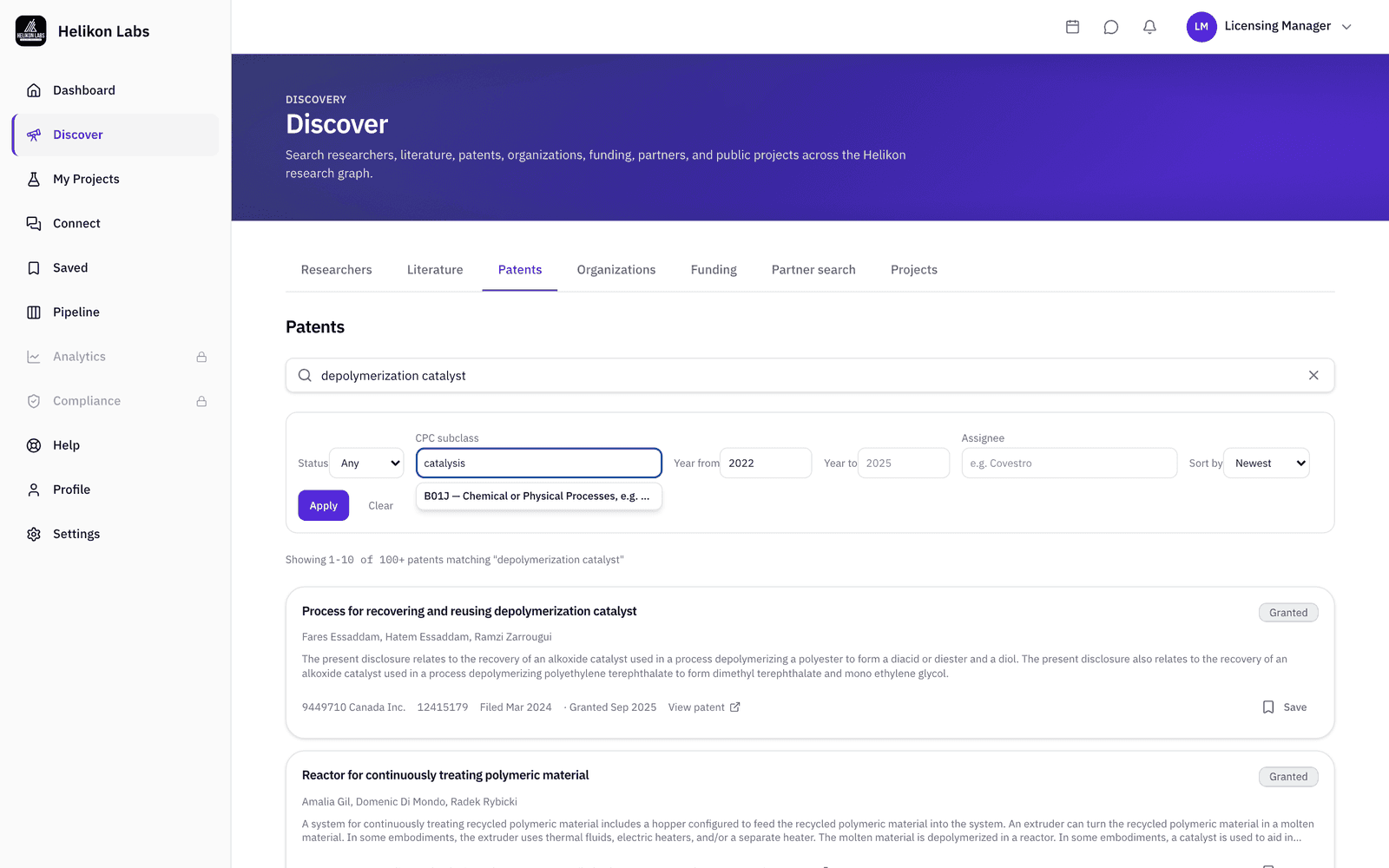
Open Discover → Patents, enter the CPC subclass from the disclosure's likely claims (type “catalysis” and pick B01J from the typeahead, or type the code), put “polyurethane depolymerization” in the search box, set Year from to the last three or four years, and sort by newest. The assignee names on the results are the first draft of your prospect list, and a handful of assignees usually account for most of the grants.
Step 2: Explore who they build on
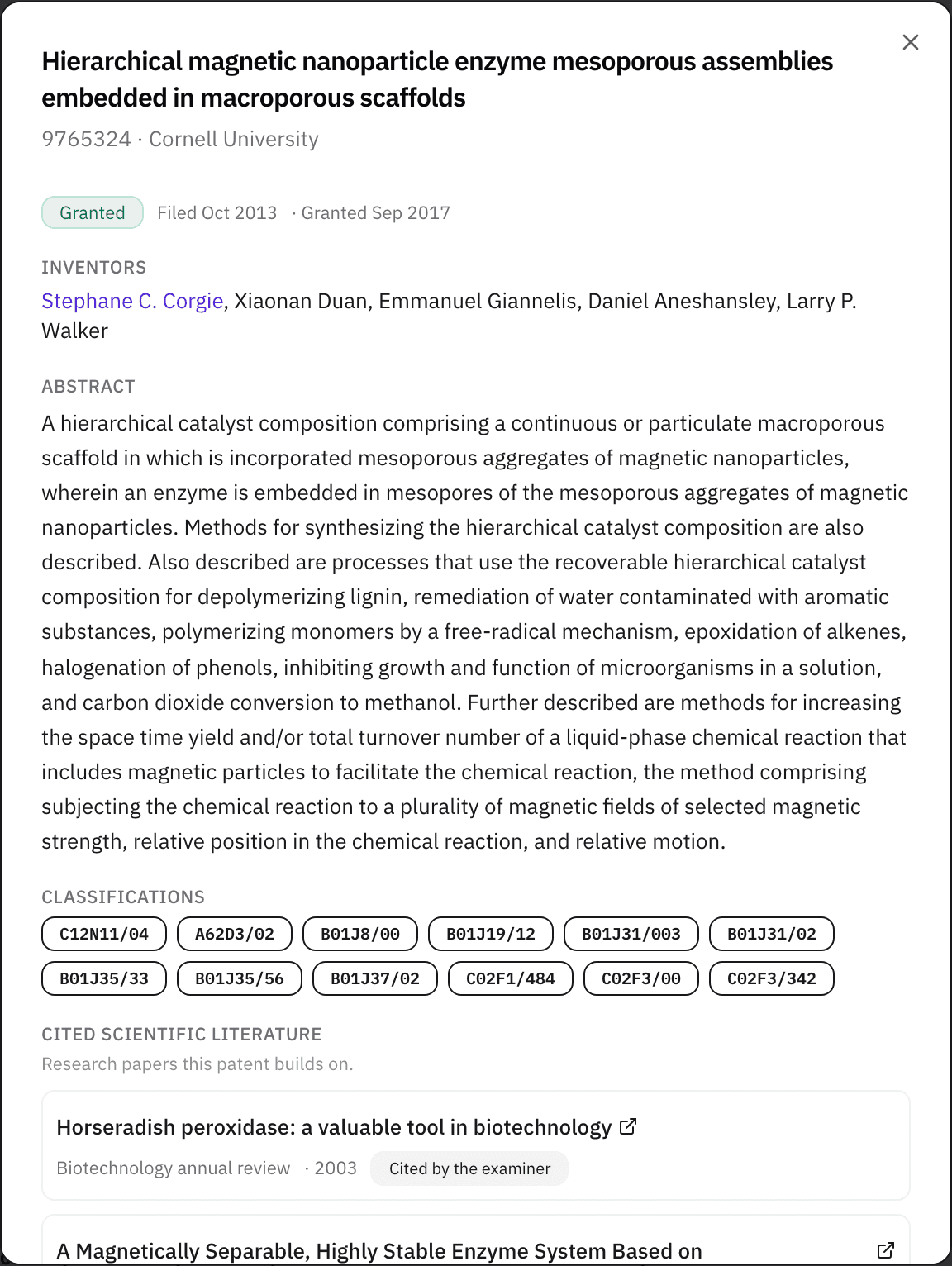
Open a patent. Cited scientific literature lists the papers its references point to. When a company's patents cite university papers in your area, that company reads the literature and has already decided the area matters. Inventor names link to researcher profiles where the platform can match them, which is the R&D contact you'd otherwise spend a week finding. An assignee whose patents cite the inventor's own group moves to the top of the list.
Step 3: Resolve the companies
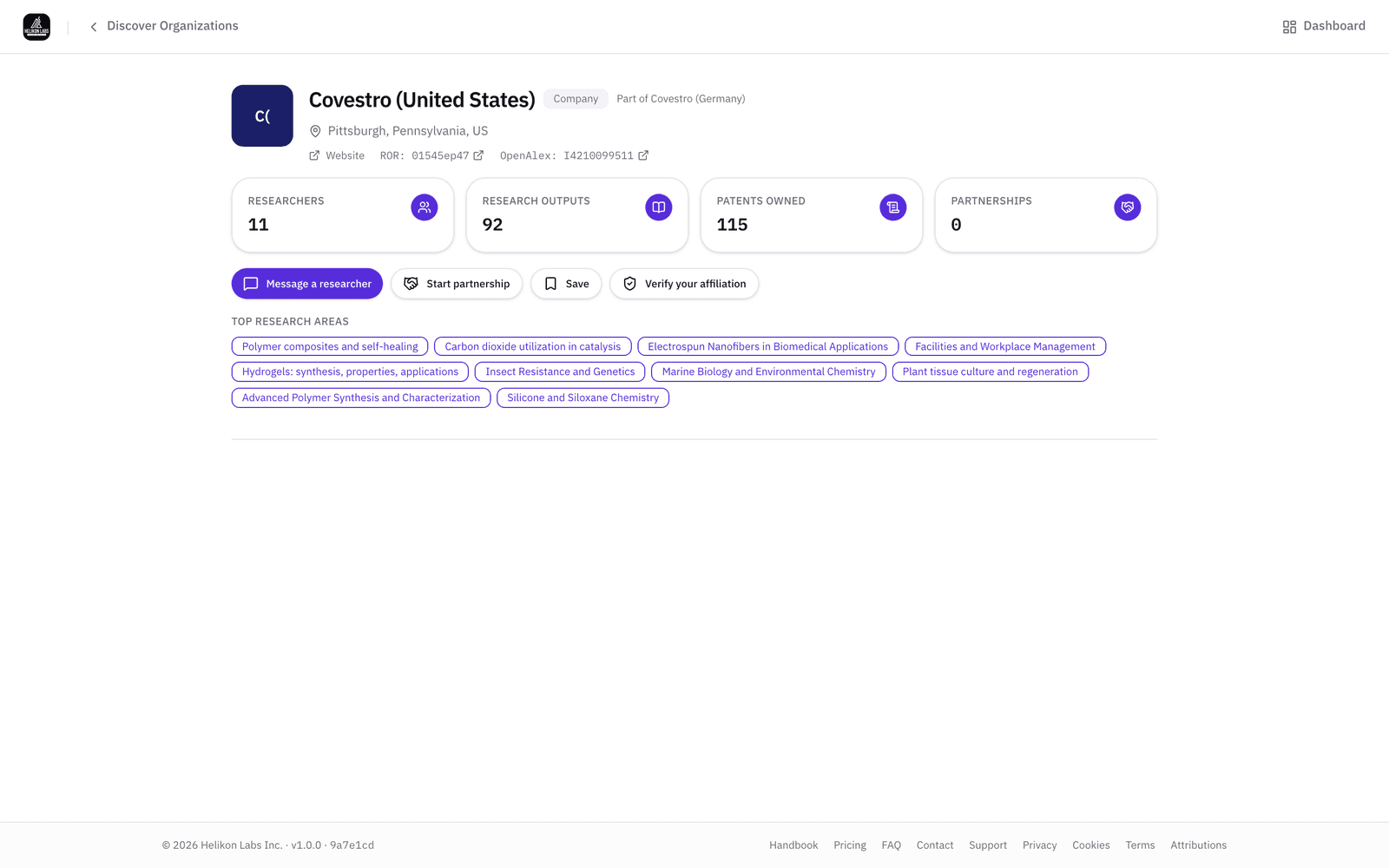
Open Discover → Organizations and search the assignee names. A company's assignee-name variants roll up to one page, and a subsidiary with its own listing shows which parent it's a part of, with owned patents, top research areas, and the researchers the record links to it. Save each with a note and a tag. An assignee that already funds work at your university is the warmest prospect on the list. For a polyurethane disclosure at a university where a materials company already sponsors a circular-economy program, that company is your first call.
Step 4: Start from the inventor's own papers
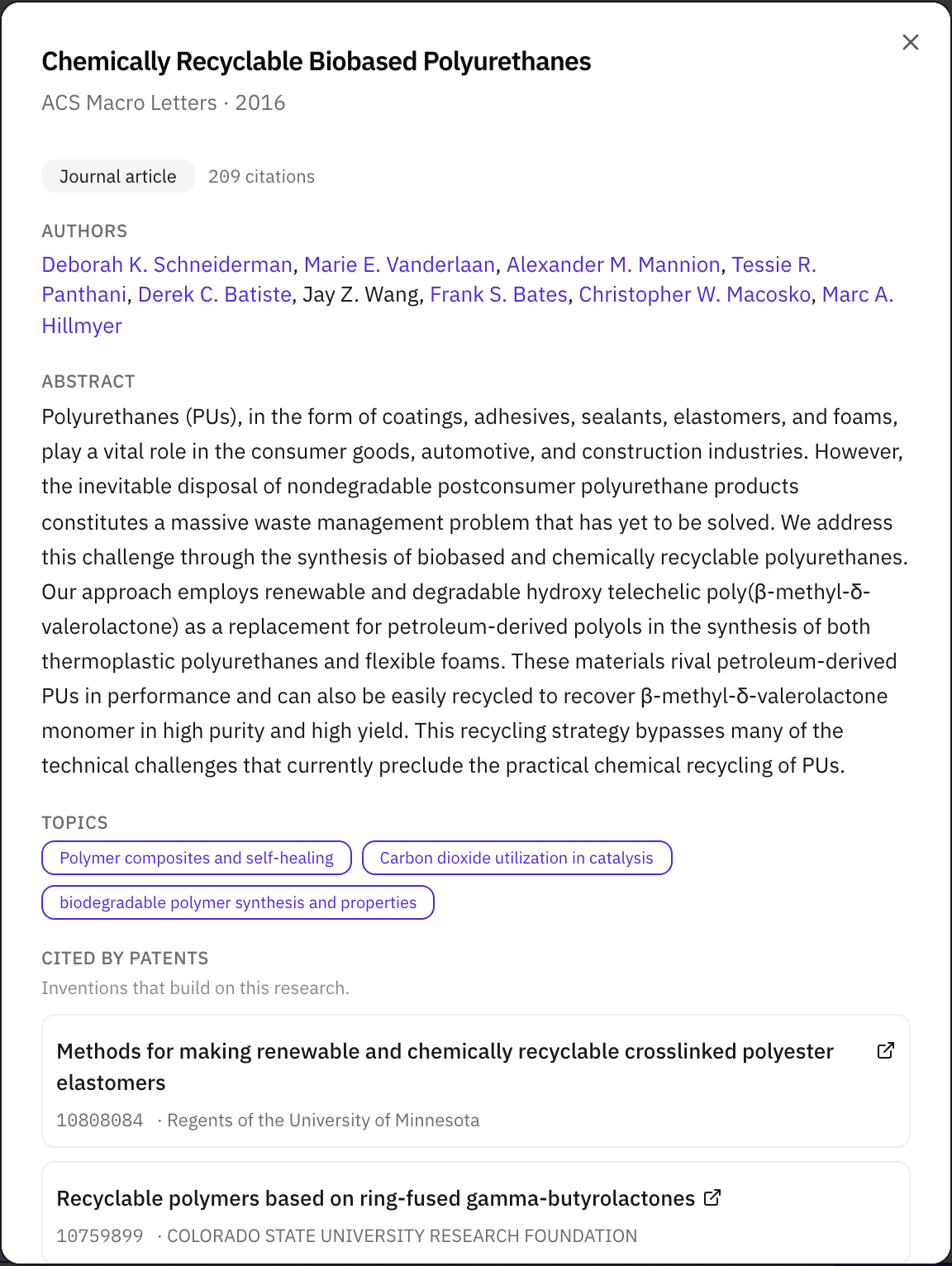
Open the inventor's profile, Research outputs, and any of the group's papers: Cited by patents lists the granted patents that cite it, with their assignees. Those are the warmest prospects on the list. Post a project with a licensing agreement type, visible to everyone, so the technology has a page members can find. On Pro, track each prospect in your Pipeline with a next action and a date.
What you’ll see
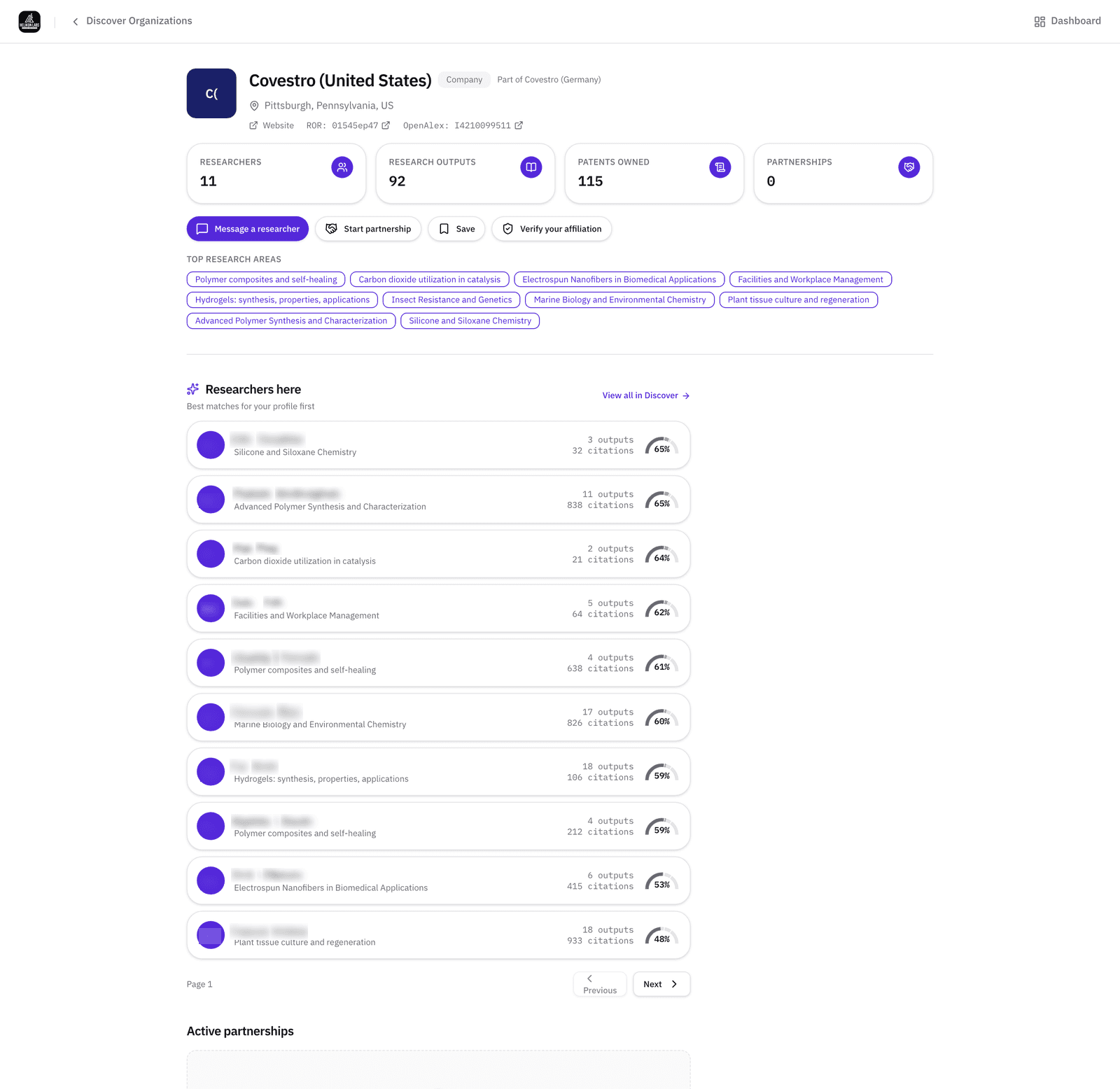
- 1. Type badge and parent. Company, with “Part of” the parent where the record has one.
- 2. Owned patents. The rollup across the company's assignee names.
- 3. Top research areas. The primary fields of the researchers affiliated with it.
- 4. Researchers. People the record links to the company, where it links any.
- 5. Message a researcher · Start partnership · Save.
What’s on Free, and what Pro adds
| Free | Pro | |
|---|---|---|
| Patents, Organizations, and Literature filters; both citation directions | All | All |
| Saved items with notes and tags | 50 | Unlimited |
| Saved-items CSV export | No | Yes |
| Pipeline | No | Yes |
Match
Licensing is partner selection with the technology fixed. The Match phase says to choose from evidence of fit, and the citation trail is the most direct evidence there is. Read about the phase →
Browse technology areas
Each page counts the researchers, publications, and U.S. patents the Helikon Research Graph holds on one technology, shows who's working on it, and gives you a problem statement to run in Partner Search.
- Additive manufacturing
- Energy storage
- Drug delivery
- Biomanufacturing
- PFAS detection and replacement
- Antimicrobial resistance
- Clean hydrogen
- Chemically recyclable plastics
- Separation membranes
- Semiconductor fab and packaging
- Carbon capture and conversion
- Solar cells
- Robotics
- Autonomous vehicles
- Coatings and adhesives
- Fuel cells
- Bio-based materials and renewable feedstocks
- Cell and gene therapy manufacturing
- Power electronics and wide-bandgap devices
- Biomaterials and tissue engineering
- Industrial AI and digital twins
- AI and computational drug discovery
- How do I decide which company to call first?
- Two public signals. Assignees with recent grants in the class are working in the area. Assignees whose patents cite your own faculty's papers are building on the work in front of you: open the inventor's Research outputs and read Cited by patents for that shorter list. Save each with a tag and start where the two overlap.
- Can I list a technology as available for licensing?
- Yes, as a project. Create it with a licensing agreement type (there are several, exclusive license among them), describe the technology and the expertise a licensee would need, and set visibility to Everyone. It's live when saved, and appears in Discover → Projects and in dashboard suggestions for members whose record fits. It's a project listing, not a marketplace.
- What if the assignee is a small company that isn't in the corpus?
- It appears as the assignee name on its granted patents, and that name is searchable in the Patents tab. Once anyone from the company joins and claims it, the organization's page fills in.
Start from the patent disclosure. Find the people who already cite it.
Free plan · No credit card required