Help center · Tutorial · 5 steps
How to search past SBIR and STTR awards and see which universities partnered
- About 10 minutes
- Free plan and up
- Checked in the app on
To see who has won SBIR and STTR awards on your topic, and which universities they partnered with, search the Past SBIR and STTR awards tab. Open Discover, then Funding, then that tab, and type your topic in plain words. Each STTR award in the list names its university partner, and the award's own page adds the topic, the solicitation, the phase, and the full abstract. It works on every plan, Free included.
Before you start: the tab holds SBIR.gov's award records from fiscal year 2020 on, for every participating agency, NIH and NSF included. We refresh it each month from SBIR.gov's award data file, which SBIR.gov says it refreshes monthly (SBIR.gov). It lists awards that have already been made. For calls that are open now, use Browse all, as in How to find research funding opportunities that match your work.
Step 1Search the awards by topic
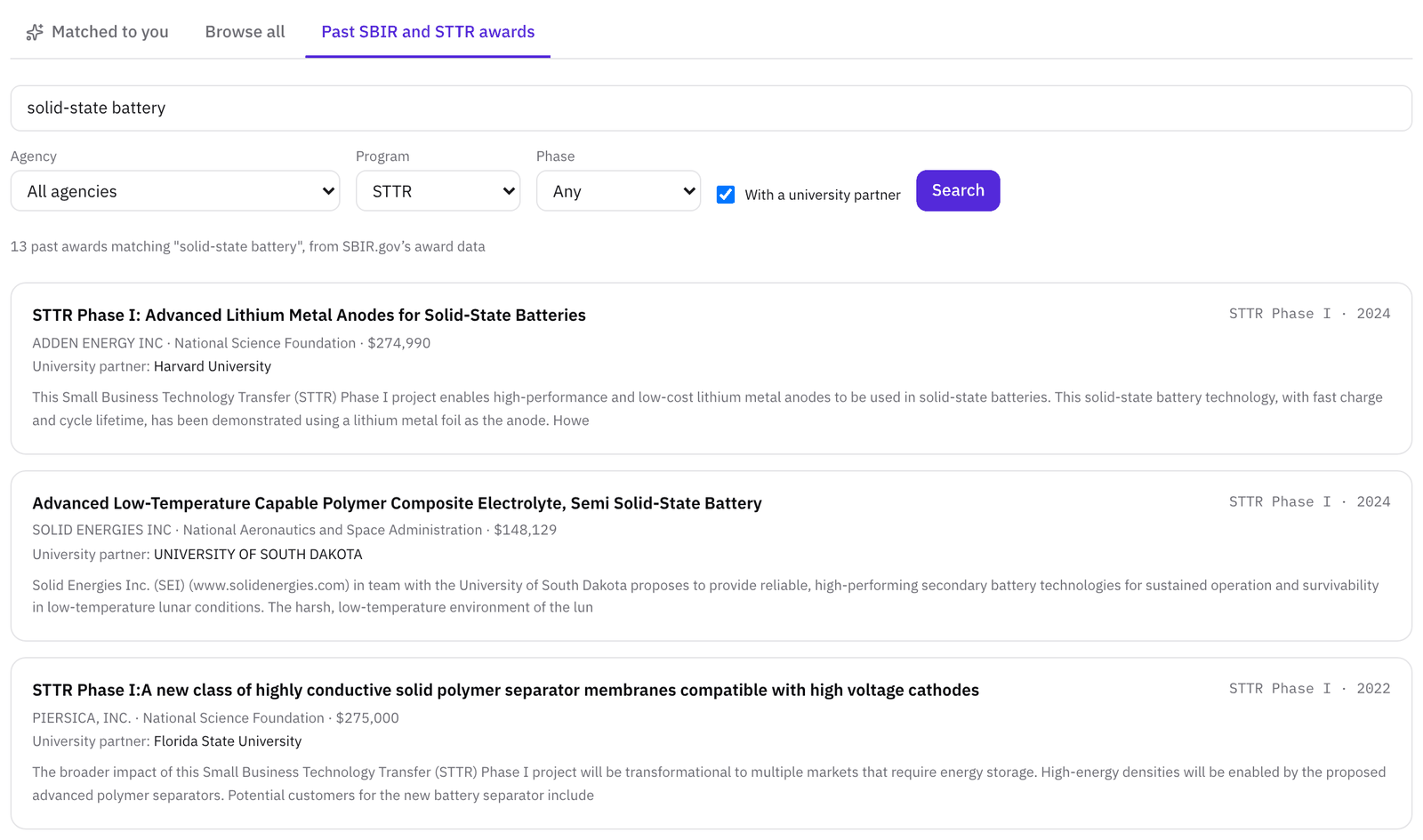
Open Discover from the left sidebar, choose the Funding tab, then Past SBIR and STTR awards. Type what your work is about into the search box and click Search.
The search looks for your words in each award's title, abstract, company name, and university partner, and it finds other forms of a word too, so electrolytes also finds electrolyte. Every word you type has to appear in the award, so start with two or three words and add more only if the list is too long. You can also steer it:
- Put a phrase in quotes, such as "solid electrolyte", to keep the words together.
- Type or between two words to accept either one.
- Put a minus sign before a word, such as -battery, to leave out the awards that use it.
With words in the box, the awards that match them most closely come first, and a word in the title counts for more than the same word in the abstract. With the box empty, the newest awards come first. Results come 20 to a page.
Step 2Narrow the list with the filters
Set any of the filters under the search box, then click Search again:
- Agency, the department that made the award. The list uses SBIR.gov's department names, so NIH awards are under the Department of Health and Human Services, and Air Force and Army awards under the Department of Defense. Each result names the component as well.
- Program: SBIR, STTR, or Both.
- Phase: Phase I, Phase II, or Any.
- With a university partner, to keep only the awards that name a partner, which in practice means STTR awards.
The line above the results counts the awards that match.
Step 3Read what each award shows
Each result shows:
- the award's title
- the program and phase, and the fiscal year of the award
- the company that won it
- the agency and its component, such as the Air Force within the Department of Defense
- the award amount
- University partner, on an STTR award
- the first lines of the abstract
Click a title to open the award's own page. Its STTR details or SBIR details section adds the Phase, the Agency component, the Topic code, the Solicitation number, and the Research partner, with a link to the company's website and the full abstract. Above that section are the amount, the funder, the award's start and end dates, the principal investigator, and the company it was awarded to.
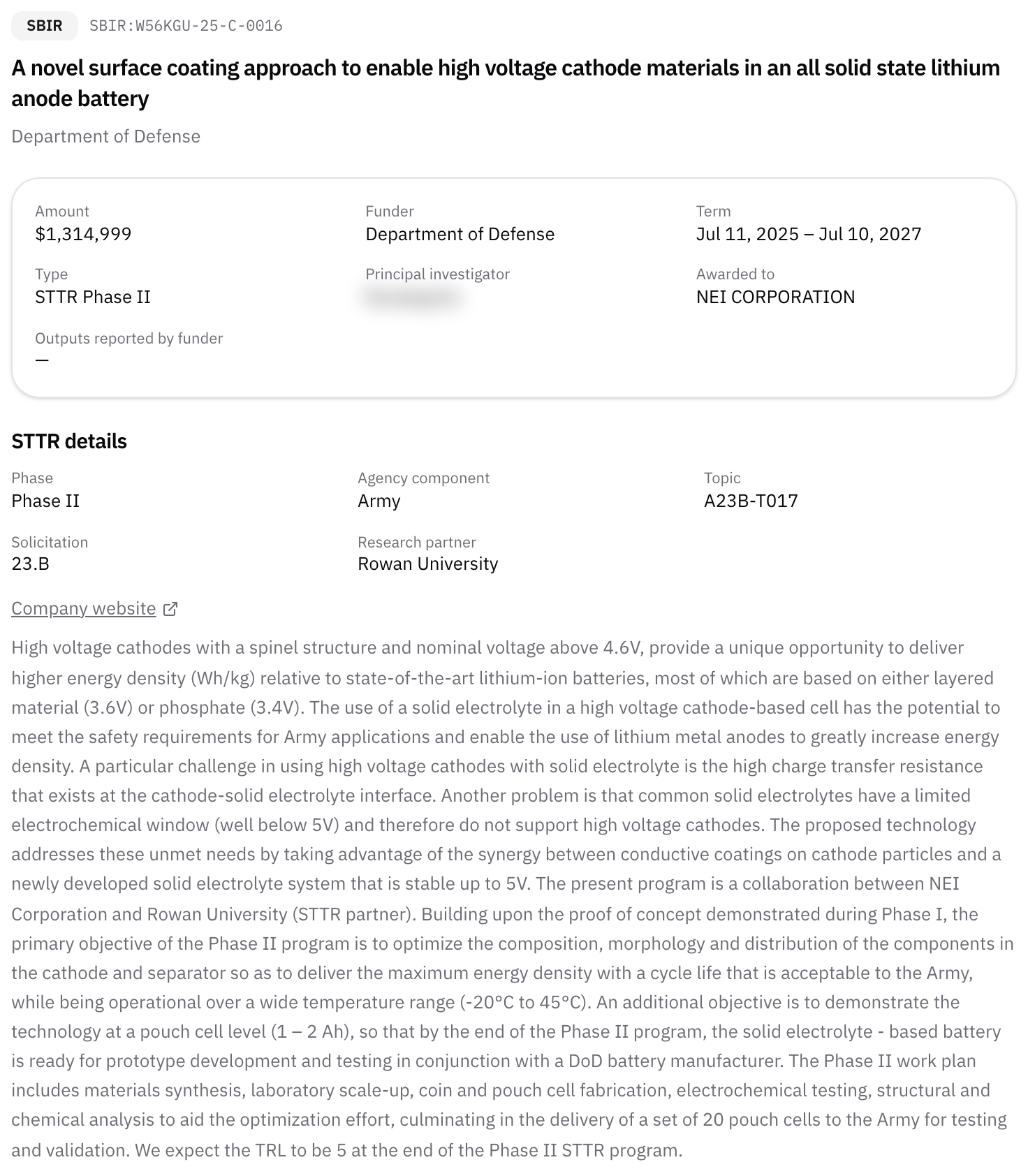
The topic code tells you which agency topic the company answered, and the solicitation number which call it came under. Look both up in the agency's current solicitation to find the topics that are open now.
SBIR.gov calls the partner the research institution. It's usually a university, and it can also be a nonprofit research organization or a federally funded research and development center (see research institution). The name is plain text, exactly as SBIR.gov records it, so search for a short form of a university's name as well as its full name to catch all of its awards.
Step 4See who partnered on your topic before you choose a university
If you're a founder looking for an STTR partner, the tab shows you which universities already work with small businesses on your problem, and how recently.
- Search your topic, set Program to STTR, and check With a university partner.
- Read down the University partner lines. Note which universities come up more than once, in which years, and in which phases.
- Open a few of their award pages and read the abstracts and topic codes, to see what kind of work each university did and for which agency.
- Find the researchers. The tab names the university, not the people who worked on the award, so open Discover, then Researchers, set Organization to that university, and search your topic. Or paste your specific aims into Partner search, as in How to use your specific aims page to find an SBIR or STTR university partner.
A university that has partnered on an STTR before has already signed at least one allocation of rights agreement, the agreement every STTR needs between the company and the research institution. Our article The STTR allocation of rights agreement, explained for founders covers what goes in it. Before you write to a professor, read What to offer a professor when you ask them to join your SBIR or STTR proposal. If you're still deciding between the two programs, start with SBIR vs STTR: which program fits when you already have a university collaborator.
Step 5Check past awards from an open call
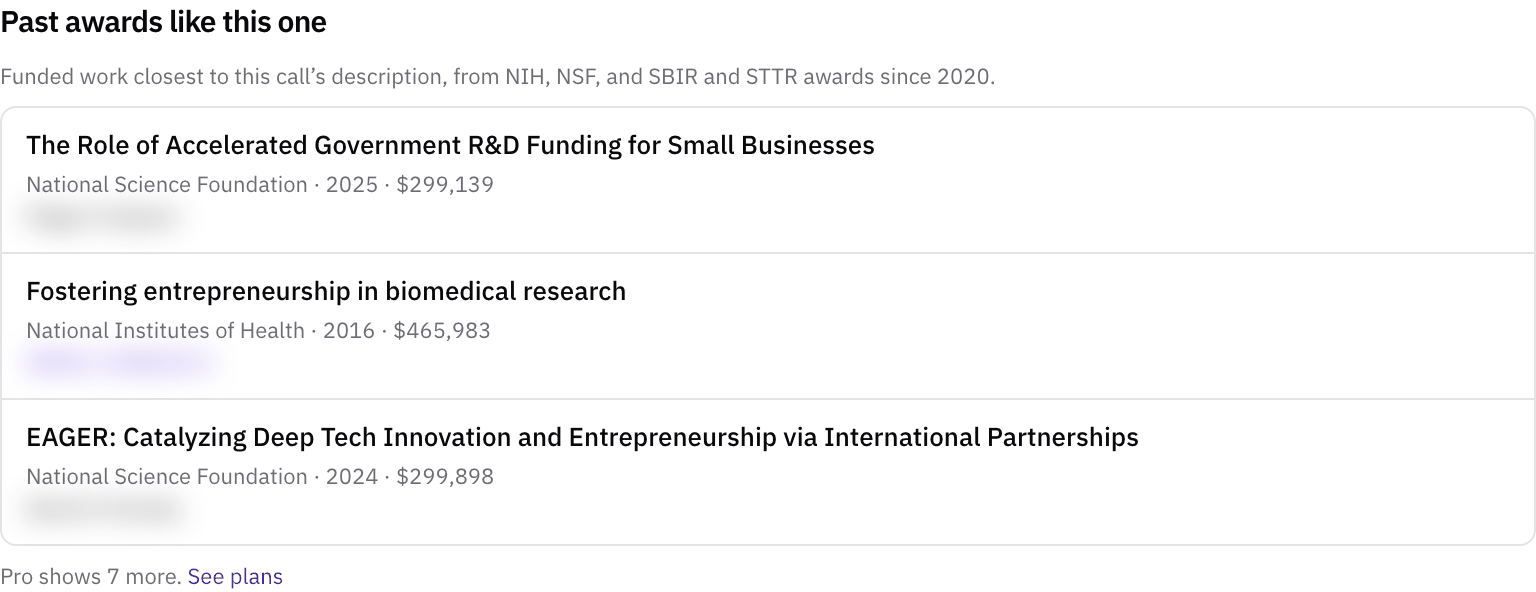
Every open call's page has a Past awards like this one section. To use it for small-business calls, open Browse all, check SBIR and STTR only, click Apply, and open a call. Below the call's details, the section lists the past NIH, NSF, and SBIR and STTR awards since 2020 that sit closest to the call's description. Each one shows the funder, the year, the amount, the principal investigator as the award names them, and the company or institution that received it.
Click a title to open the award's page, where an STTR award shows its research partner. Free shows 3 awards, and Pro and higher 10.
What to read next
If you'd rather download the records, SBIR.gov's own award search is free. It searches by company name, keyword, topic code, and research institution. It filters by agency, phase, program, year, and state, and downloads up to 10,000 results at a time (SBIR.gov). Our research funding databases compared sets SBIR.gov beside the other free and paid funding databases.
When you've chosen a partner, work through the SBIR and STTR partner readiness checklist together. Our guide SBIR and STTR university partners: the rules, how to find one, and what to agree before you submit covers the rest.
Sources
- SBIR.gov, Award data (award search, filters, and bulk downloads). www.sbir.gov/awards
- SBIR.gov, Award data dictionary. www.sbir.gov/data-resources/data-dictionary/award
Related
- GuideSBIR and STTR university partners: the rules, how to find one, and what to agree before you submit
- GlossarySTTR (Small Business Technology Transfer)
- GlossarySBIR (Small Business Innovation Research)
- GlossaryResearch institution (SBIR and STTR)
- GlossaryPhase I and Phase II (SBIR and STTR)
- GlossaryAllocation of rights agreement
- WalkthroughFind a university partner for your SBIR/STTR proposal
- ArticleSBIR vs STTR: which program fits when you already have a university collaborator
- ArticleWhat to offer a professor when you ask them to join your SBIR or STTR proposal
- ArticleThe STTR allocation of rights agreement, explained for founders
- TemplateSBIR and STTR partner readiness checklist: a free template for founders and university partners
- HelpHow to find research funding opportunities
- HelpCheck a researcher's grants and funding history
- GlossaryIndirect costs (F&A)
- GlossarySpecific aims page
- GlossarySubaward