Help center · Tutorial · 5 steps
How to run a phase-gate review and record what was decided
- About 5 minutes
- Free plan and up
- Checked in the app on
On Helikon, the project owner or an admin records each phase-gate review on the project's Milestones tab. You name the gate, pick one of five decisions (Go, Conditional go, Hold, Recycle, or Kill), and add the date, the criteria the gate judged against, and any conditions. Everyone on the project sees the decision, and it stays in the project's audit trail. It works on every plan.
The five decisions come from Robert Cooper's stage-gate research. His 1994 article describes gates as the "Go/Kill/Hold/Recycle check points" between stages. It adds the conditional go, for a project that looks good on partial evidence (Cooper, Journal of Product Innovation Management, 1994, pages 4 and 10). Our stage-gate glossary entry explains how research collaborations adapt the model.
Before you start: you need a project you own or administer. Editors, collaborators, and viewers can read every decision but can't record one. If the gate closes a milestone, add that milestone first. How to plan a research project schedule covers milestones.
Translation Box: "gate review"
On the industry side: a gate review is a funding decision. The question is whether the next stage still deserves its budget, judged against technical and commercial criteria agreed in advance.
On the academic side: the closest habits are a funder's progress review or a thesis committee meeting, which judge whether the science is sound. A gate asks something narrower: whether this project should continue on this plan, with this sponsor. Saying so before the first review keeps a Hold or a Recycle from reading as a verdict on the lab's work.
What do the five decisions mean?
Each decision records what the reviewers agreed. Here's what each one means and what to change on Helikon after you record it:
| Decision | What it means | What to do next on Helikon |
|---|---|---|
| Go | The project moves on to the next stage as planned. | Mark the gate's milestone Completed. |
| Conditional go | The project moves on, provided named conditions are met by a date. | Write the conditions and the date in Notes, then add a checklist item or a milestone for each condition so its reminders go out. |
| Hold | The project waits. Cooper's article gives the case: when "must-have" information isn't ready at the review, "the decision is 'hold.'" | Set the milestones that are waiting to On hold. |
| Recycle | The stage's work goes back for another pass and returns to the same gate. | Move the stage's milestones to their new dates. If the project has a baseline, the owner or an admin re-baselines with a note saying why. |
| Kill | The project stops. | Archive the project from its Settings tab. It stays readable, stops counting against your active projects, and isn't scored for health. |
Every decision leaves the same three records:
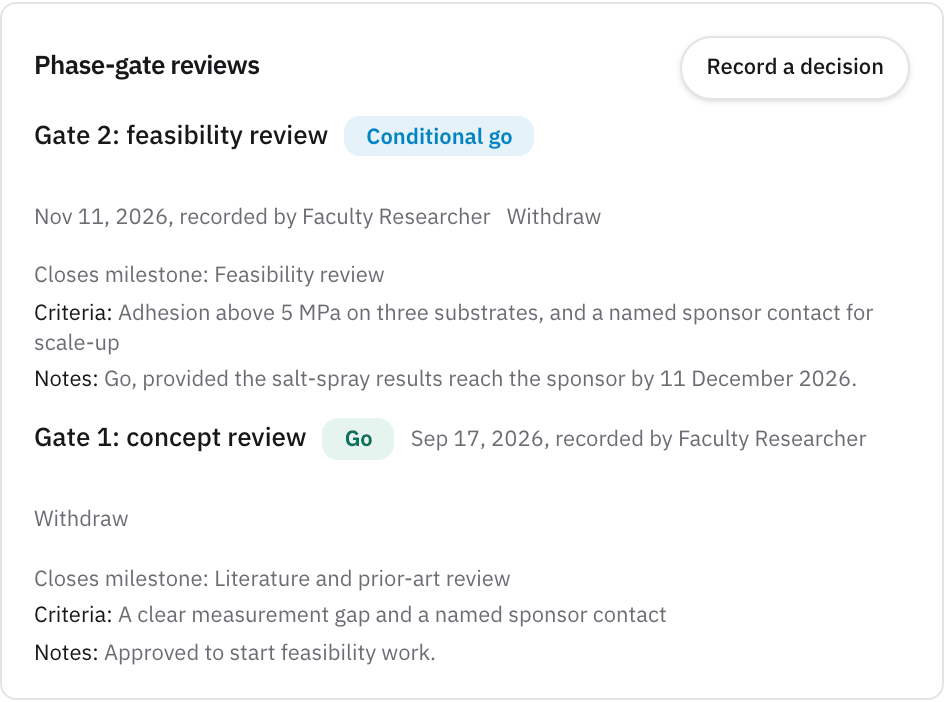
- A line on the Phase-gate reviews card, with the gate's name, the decision as a colored label, the date, who recorded it, the milestone it closes, the criteria, and the notes.
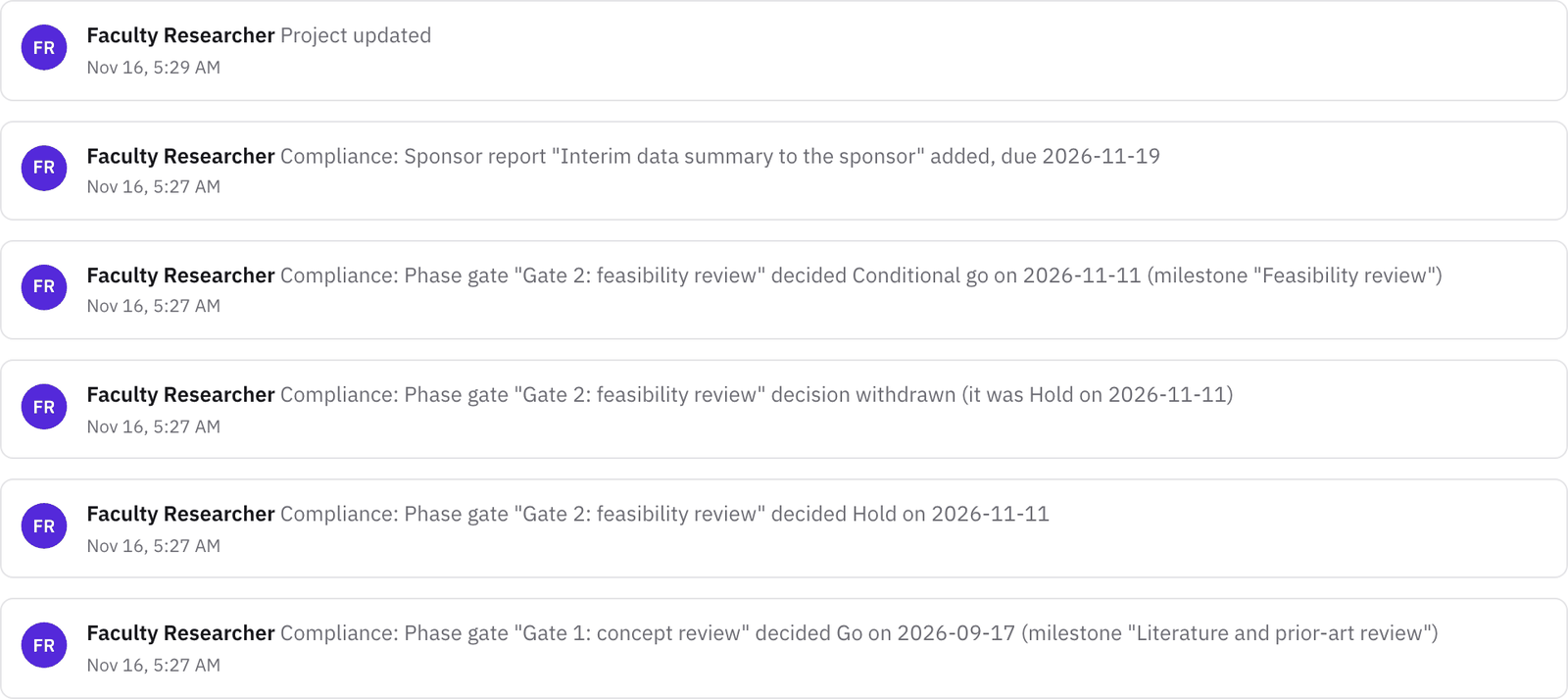
- A compliance entry in the Activity tab, such as Compliance: Phase gate "Gate 2: feasibility review" decided Conditional go on 2026-11-16. Compliance entries are kept even if the project is later deleted.
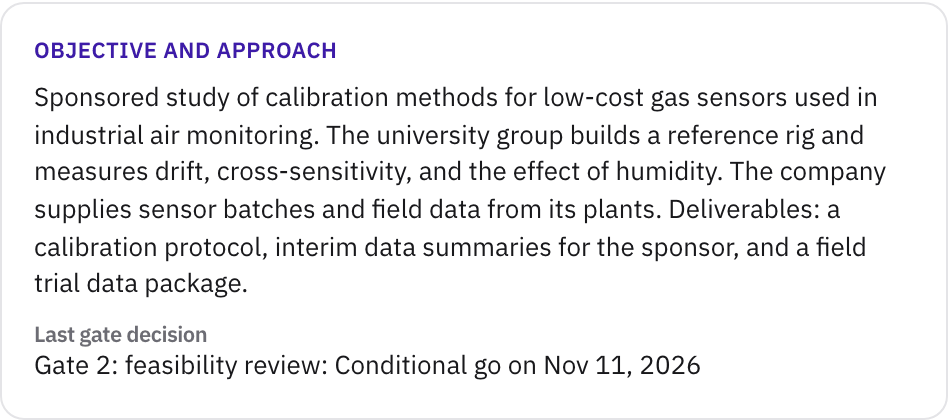
- The latest decision on the quad chart. The Reports tab's quad chart shows it under Last gate decision. On Pro, each saved status report keeps the decision that stood at the end of its period.
Recording a decision doesn't change anything else. The project's status, its milestones, and its dates don't change until you change them, so use the table's last column as your list of what to update.
Step 1Agree the gate's criteria before the review
Write down what the gate will judge before anyone meets. A criterion like "adhesion above 5 MPa on three substrates, and a named sponsor contact for scale-up" gives the reviewers something to decide against. Cooper's 2014 review notes that financial criteria alone don't yield the best portfolios, mainly because the data are missing. The next-generation gates he describes use a scorecard with both financial and nonfinancial criteria (Cooper, Research-Technology Management, 2014, pages 25 and 29). In a research collaboration, that usually means a technical criterion and a criterion about fit with the sponsor's plans, as our stage-gate glossary entry describes.
Add the gate itself as a milestone, such as "Feasibility review", with its date and an owner, so the reminders go out before the meeting. If the collaboration has a steering committee, its quarterly meeting is the natural place for the review, and our Governance Charter records who sits on it.
Step 2Open the Phase-gate reviews card
Open the project and go to the Milestones tab. The Phase-gate reviews card sits beside the baselines, below the timeline. Until the first decision, it reads "No gate decisions yet." Click Record a decision.
Step 3Record the decision
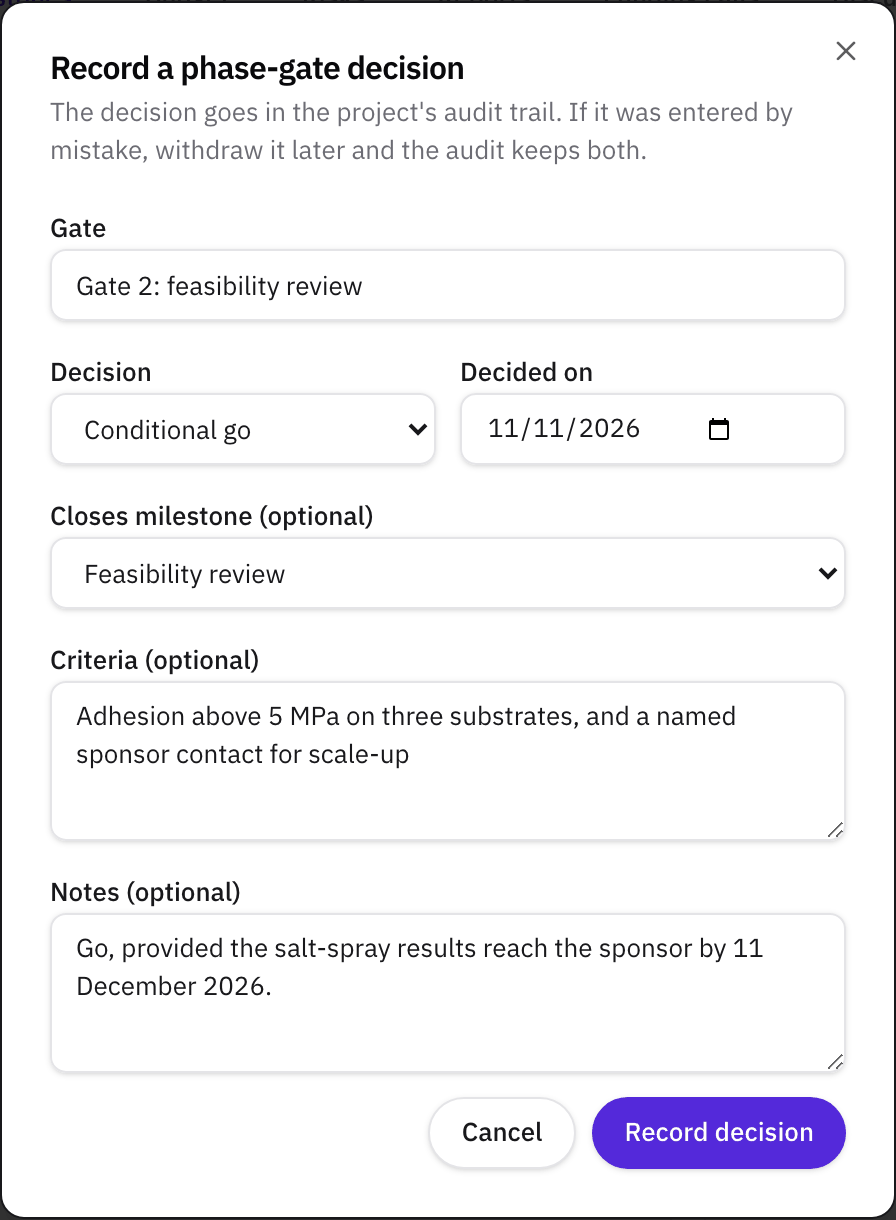
Fill in the Record a phase-gate decision form:
- Gate: the gate's name, such as "Gate 2: feasibility review".
- Decision: Go, Conditional go, Hold, Recycle, or Kill.
- Decided on: the date of the review. It defaults to today.
- Closes milestone (optional): the milestone this gate ends, such as "Feasibility review". The list appears once the project has milestones.
- Criteria (optional): what the gate judged against, from step 1.
- Notes (optional): what the reviewers said. For a conditional go, write the conditions and the date they're due here.
Click Record decision. The decision appears on the card right away.
Cooper's 1994 article warns that a conditional go needs a firm project leader and gatekeepers who stay involved, or it "becomes a perfunctory 'Yes'" (Cooper, 1994, page 10). Writing the conditions and their date into Notes, and adding each condition as a dated checklist item, keeps them in front of the team.
Step 4Check the record
Open the Activity tab and click the Status filter. The decision is listed as a compliance entry with the gate, the decision, the date, and the milestone it closes, plus who recorded it and when.
Then open the Reports tab. The quad chart's Objective and approach quadrant shows the latest decision under Last gate decision, so anyone reading the chart sees where the project stands.
Step 5Withdraw a decision recorded by mistake
If a decision went in wrong, for example under the wrong gate, click Withdraw beside it on the card and confirm. The decision leaves the card, and the Activity tab keeps two entries: the decision as it was recorded and its withdrawal. Then record the right decision. Only the owner or an admin can withdraw one.
What to do next
- Act on the decision. The table above lists what to change after each decision. After a conditional go, the checklist items you added send their reminders 3 days before, 1 day before, and 1 day after their due dates.
- Report the gate to the sponsor. How to report project status covers the quad chart, the health color, and, on Pro, saved status reports with PDF and PowerPoint export.
- Agree how gates work for the whole collaboration. Our guide How to manage a university-industry research collaboration covers milestone and gate rules, the governance body, and status reporting.
Sources
- Cooper, R. G., 1994, Perspective: Third-generation new product processes, Journal of Product Innovation Management 11(1), 3 to 14. doi.org/10.1016/0737-6782(94)90115-5
- Cooper, R. G., 2014, What's next? After Stage-Gate, Research-Technology Management 57(1), 20 to 31. doi.org/10.5437/08956308X5606963
Related
- GuideHow to manage a university-industry research collaboration: the plain guide
- GlossaryStage-gate
- GlossaryMilestone
- GlossarySteering committee
- WalkthroughManage an R&D collaboration project: schedule, obligations, budget, and status reports
- HelpHow to plan a research project schedule
- HelpKeep a risk register for a research project
- HelpReport project status with a quad chart and status reports
- TemplateGovernance Charter template for university-industry research collaborations
- GlossaryAlliance manager
- GlossaryDecision rights
- GlossaryEscalation protocol